
Customized professional training
AI training for HR teams
Your HR teams practice on their own files, with Copilot M365 or the AI tool validated by your CIO: employee services, social data, policies and clearer communications.
Bristol Myers Squibb : from 20% to 72% regular use of AI in four waves Agirc-Arrco : Prompt Party® on Copilot M365 after two years of webinars rated up to 9.5/10 · 4,850 professionals trained

 Crédit AgricoleAlptis
Starting from €1,500 excluding VAT per half-day · Written proposal within 24 working hours, without obligation.
The training in brief
Everything you need to make a decision, in nine lines. The objectives, process, and use cases are below.
- What it is
- A customized training in generative AI For HR teams: a maximum of twelve participants, each working on their own computer, working on their own files. No lectures or demonstrations: 70% hands-on practice, and a fifty-page booklet provided at the end.
- What we work on there
- Your daily HR services : answering employee questions based on your documents, analyzing social data, writing clear policies and communications, monitoring applications and arrivals.
- For who
- The teams Human resources, employee relations and HR developmentAll levels, including employees who have never opened the tool.
- Duration and rhythm
- 1 hour 30 minutes or half a dayAvailable in one go or in waves of sessions to cover the entire team. Also available as a webinar.
- Where and in what language
- At your premises anywhere in France, or remotely. French or English.
- Price
- €1,500 to €2,000 excluding VAT Half-day sessions for up to twelve participants, with a sliding scale of prices when sessions are repeated. See our price benchmarks.
- On which tool
- Yours: Copilot, ChatGPT, Claude, Gemini, Mistral or your secure internal assistant. We train within your tenant, without third-party tools.
- Funding
- Eligible for OPCO and ESF+ funding. NextStart is a registered training organization (No. 11756140675): the session is part of your skills development plan, with the agreements and documents expected by your funder.
- Lead time
- Written proposal within 24 business hours, without obligation, after a 30-minute framing exchange.
Why train your HR teams in generative AI?
HR teams need to save time without compromising the quality of social dialogue, the confidentiality of information, or the fairness of decisions.
Repetitive requests to process
Responding to employees, procedures and internal communications take up time that could be devoted to human support.
Social data that is difficult to synthesize
Surveys, verbatim comments and HR indicators require structured analysis to uncover truly useful trends.
Content that can be adapted to a wide range of audiences
The same rule often needs to be explained differently to employees, managers, staff representatives, and members of management.
Particularly sensitive information
The use of AI requires clear rules to protect personal data, limit bias, and retain human validation.
What your HR teams will be able to do upon exit
Six objectives, assessed during the session on the files that your teams bring.
- Write and revise HR content (responses to employees, procedures, policy documents) using an AI tool, then check its compliance before publication.
- Structure the analysis of an internal survey or a set of social indicators, and draw three reasoned conclusions from it.
- Create a job description, interview grid, or skills framework based on your existing structures
- Adapt the same message to employees, managers, and staff representatives without changing its substance.
- Recognize HR situations where AI output cannot be used without human verification
- Apply your internal usage rules, the GDPR, and Section 4 of the AI Act to your own records
Your data does not leave your environment
Social data, individual files, verbatim transcripts of internal investigations: your most sensitive information does not leave your environment.
The exercises are based on your real-world situations, never on your actual data. We develop the practical cases with your business expert using anonymized or reconstructed examples, and we work within the environment approved by your IT department: Copilot Chat, Copilot M365, ChatGPT (Enterprise or Azure OpenAI), Gemini, Claude, Mistral, or a locally installed open-source solution for the most sensitive data. No documents, files, or personally identifiable information are transmitted to a public model during the session. The final part of the training is dedicated to GDPR, the AI Act, and the development of your internal usage rules, ensuring that each participant leaves with a clear understanding of what they can and cannot submit to an AI tool.
 Copilot M365
 Claude
 ChatGPT
 Gemini
 Vibe
VibeYour sector has its constraints, we are aware of them.
HR use cases also depend on your sector: employee relations and banking secrecy in banking, health data in insurance, regulatory compliance in pharmaceuticals, sensitive data and export controls in manufacturing, and siloed environments in the public sector. Choose yours to see how we work with organizations similar to yours.
How we prepare for the session with your HR contact person
The content, examples and tools are prepared with your subject matter expert before the session.
Feasibility study
Gathering of needs, participant level, constraints and priority use cases.
Customization
Adaptation of the schedule, demonstrations and exercises, then validation with your organization.
Training
Participatory facilitation, guided practical application and distribution of educational materials.
The program, hour by hour
A balance designed to understand, practice and then secure uses in the work environment.
Schedule for the half-day (3 hours 30 minutes)
- 0 p.m. to 00 p.m. Fundamentals of generative AI, getting to grips with the chosen tool, memory, personalized instructions, modes of reasoning and in-depth research.
- 0 p.m. to 20 p.m. : prompting method applied to a first HR case brought by the group, and verification of sources.
- 0 p.m. to 40 p.m. Prompts and Agents workshop, first block of cases (employee services, policies and procedures). Each participant works on their own case.
- 2 p.m. to 40 p.m. : second block of cases (social data, listening to employees, skills and mobility), with cross-feedback.
- 3 p.m. to 10 p.m. : bias and limitations, confidentiality, GDPR, Article 4 of the AI Act, then drafting of the team's rules of use.
The 1 hour 30 minute format follows the same tight structure: 20 minutes of fundamentals, 55 minutes of workshop on two chosen cases, 15 minutes of usage framework.
HR situations we can work on
The exercises are selected according to your priorities. The groupings below retain the details of the situations that can be worked on.
Employee Services
- Prepare an answer to an HR question
- Create an internal FAQ
- To simplify a rule or procedure
- Adapt the response to the employee's context
Policies and Procedures
- Drafting an HR policy
- Update a procedure
- Compare multiple versions
- Prepare a cover note
HR Data
- Analyze social indicators
- Identify trends and anomalies
- Commenting on a dashboard
- Prepare a summary for management
Listening to employees
- Analyze an internal investigation
- Group the verbatim comments by theme
- Identify the priority irritants
- Develop an action plan
Skills and training
- Develop a development plan
- Identify emerging skills
- Prepare a skills sheet
- Adapting a route to different audiences
Monitoring and transformation
- Summarize a regulatory change
- Preparing the communication of a change
- Exploring the impacts of AI on professions
- Define responsible usage rules
Concrete examples of use cases for HR teams
Ten resources from the NextStart catalogue, out of the twenty-one ready-to-use for HR, to extend training with directly applicable cases.
One-stop shop for HR and employee services →
Answering common employee questions using HR documents.
Structuring a fair job interview →
Construct a grid of questions and criteria that are identical for all candidates.
Prepare for arrivals →
Trigger the onboarding actions and check that nothing is missing on the first day.
Ongoing analysis of the social climate →
Cross-referencing requests, verbatim comments and indicators to highlight emerging themes.
Prepare for a mandatory annual negotiation →
Construct the quantified inventory, the meeting file and the argument by theme.
Produce the social report and the equality index →
Calculate the indicators, comment on them and prepare the corrective action plan.
Transforming an annual review into a development plan →
Moving from wishes noted in an interview to a dated and measurable development plan.
Write a job description based on a manager's needs →
Transforming an oral brief into a structured job description and selection criteria.
Onboarding and skills development coach →
Supporting each new arrival with a program tailored to their role.
Leveraging an annual interview campaign →
Identify themes by department and training needs, anonymized outlines.
Copilot Tutorial
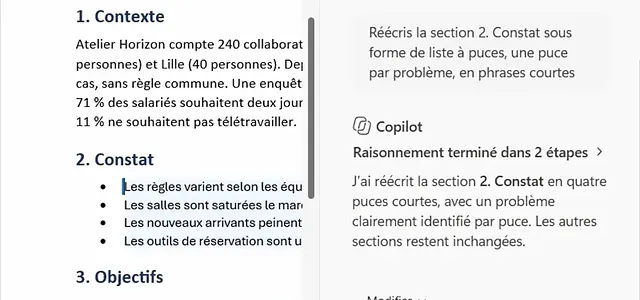
Copilot in Word, on an HR note
Summarize a scoping note on hybrid work, restructure the findings, compare three scenarios in a table and write the recommendation: our tutorial shows each instruction and each result, with a Microsoft 365 Copilot license.
The AI toolkit for HR teams: 28 use cases and prompts in 4 levels
To get started before the training, or to allow your HR team to continue progressing independently afterward: 28 HR use cases with ready-to-copy prompts, categorized into four levels, and a twelve-week program to work through them as a team, one hour per week. Each case study is marked with a green, orange, or red light depending on the data it involves and the applicable HR law: GDPR, AI Act, Labor Code, and consultation with the Works Council.
- Level 1, initial reflexes: inclusive job offer, responding to a request based on the agreement, procedure in plain language
- Level 2, processing information: fair interview grid, survey transcripts, training needs of a campaign
- Levels 3 and 4: HR Helpdesk Assistant, onboarding process, supervised monitoring agents, social report, annual mandatory negotiations
- Self-assessment, 12-week calendar, checklist before any new HR use, sources
Receive the kit
The download link will be sent to you by email.
References and feedback
NextStart.AI training courses are deployed in large organizations, on both public tools and secure internal environments. Three detailed case studies and what participants in the professional training courses have to say about them.
Airbus470 participantsAirbus595 participants CNES673 participants
 Alptis450 participants31 AI ChampionsAgirc-Arrco650+ participants
 Bristol Myers Squibb237 participants10 AI Champions
 Ceva Animal Health209 participants
 SATT network173 participants
 Cerema145 participants
 Engie11 participants
 AÉSIO mutual21 participants
 Crédit Mutuel13 participants
Bristol Myers Squibb →
Pharma headquarters, approximately 450 targeted employees
84 workshops Prompt Party® of 45 minutes in five waves, rated from 4.71 to 4.81/5. Regular use of AI increased from 20% to 72% from the fourth wave onwards.
Agirc-Arrco →
Supplementary pension · Copilot M365
Two years of AI webinars rated up to 9.5/10, then a Prompt Party® on Copilot M365 within the organization's tenant.
Airbus →
Aeronautics · Secure internal tool
The GenAI Challenge 2025: six Prompt Party® in English in four countries, on Airbus' internal AI tool, with 4.4/5 satisfaction and 94% of ratings between 4 and 5.
Participants in the professional training courses, average rating 8,6/10: "Powerful tool, makes you want to use it more, great practical application" · "Very good to be able to practice with concrete examples" · "Training adapted to our profession, helps us develop in light of our challenges" · "100% practical, answers to varied use cases, responsive trainers"
Frequently asked questions about AI training for HR teams
Answers to key questions about the level, tools, personalization and modalities of the training.
Do you need to already know how to use ChatGPT or Copilot?
No. The content is adapted to the level of the participants, from the discovery of principles to the construction of more advanced working methods.
Can the training use our internal tool?
Yes. The session can be organized with the tool approved by your IT department, including Copilot, ChatGPT (Enterprise or Azure OpenAI), Gemini, Claude, Mistral or a local solution.
Can we work on our own use cases?
Yes. Priority situations are selected with your contact person before the session, then transformed into adapted and safe exercises.
What is the difference between the 1 hour 30 minute format and the half-day format?
The 15-hour format follows the same concise structure: 20 minutes of fundamentals, 55 minutes of workshop on two case studies chosen with you, and 15 minutes on the framework for use. The half-day format allows for more case studies, individualized feedback, and the drafting of team rules of use.
Can the training be funded?
Our training courses are eligible for OPCO and ESF+ funding. NextStart.AI helps you identify the necessary elements for your application.
Can we work with real HR data?
The exercises use anonymized or reconstructed examples. No personally identifiable or confidential data is transmitted to a public model.
Does the training address biases in HR decisions?
Yes. Participants learn to identify biases, check outputs, and maintain human decision-making in sensitive situations.
How much does the training cost?
From €1,500 to €2,000 excluding VAT per half-day session for up to twelve participants, with a sliding scale for consecutive sessions; the 1.5-hour format and the webinar version are priced upon request. We will send a detailed quote within 24 business hours of our initial discussion.
How soon can a session be organized?
Allow one to two weeks between your agreement and the session, the time needed for framing with your HR contact, personalization of exercises and validation of the schedule.
What deliverables do the participants receive?
A booklet of about fifty pages, the prompts and agents built during the workshop on your own cases, and the rules of use written collectively at the end of the session.
Let's build your customized HR training
Describe your situation in a few lines. We will get back to you within 24 business hours with a proposal tailored to your teams, tools, and schedule.
Do you prefer to call or write? +33 1 89 16 48 05 or hello@nextstart.aiYour contact details are only used to reply to you.
NextStart is a registered training organization under number 11756140675. This registration does not constitute state approval.