
Customized professional training
Formation IA pour la finance et le contrôle de gestion
Analyze your data faster, detect discrepancies and turn numbers into understandable recommendations.
Starting from €1,500 excluding VAT per half-day · Written proposal within 24 working hours, without obligation.
The training in brief
Everything you need to make a decision, in nine lines. The objectives, process, and use cases are below.
- What it is
- A customized training in generative AI For finance teams: a maximum of twelve participants, each working on their own computer and their own files. No lectures or demonstrations: 70% hands-on practice.
- What we work on there
- Your analyses and your closing statements : data exploration and discrepancy detection, monitoring of open points and missing supporting documents, transformation of figures into recommendations understandable by non-financial experts.
- For who
- The teams finance, management control and accountingAll levels, including employees who have never opened the tool.
- Duration and rhythm
- 1 hour 30 minutes or half a dayAvailable in one go or in waves of sessions to cover the entire team. Also available as a webinar.
- Where and in what language
- At your premises anywhere in France, or remotely. French or English.
- Price
- €1,500 to €2,000 excluding VAT Half-day sessions for up to twelve participants, with a sliding scale of prices when sessions are repeated. See our price benchmarks.
- On which tool
- Yours: Copilot, ChatGPT, Claude, Gemini, Mistral or your secure internal assistant. We train within your tenant, without third-party tools.
- Funding
- Eligible for OPCO and ESF+ funding. NextStart is a registered training organization (No. 11756140675): the session is part of your skills development plan, with the agreements and documents expected by your funder.
- Lead time
- Written proposal within 24 business hours, without obligation, after a 30-minute framing exchange.
Why train your finance teams in generative AI?
Finance functions must accelerate the analysis and reporting of figures while maintaining control over sources, calculations and sensitive data.
Time-consuming management comments
Drafting the initial analyses and explaining the discrepancies takes time with each reporting cycle.
Complex data that needs to be made readable
Teams need to transform technical charts and documents into messages that decision-makers can understand.
Essential checks
Even a convincing answer can contain an error. The generated results must be compared with the source data and validated by a professional.
A strong requirement for confidentiality
Budgets, forecasts and results cannot be copied into a tool not approved by the IT department.
What your finance teams will be able to do at the exit
Six objectives, assessed during the session on the files that your teams bring.
- Write a management commentary on any variance between budget and actual results, then reconcile each amount with its source before distribution.
- Structure the analysis of a set of accounting or management data (analytical balance sheet, general ledger, budget monitoring) and draw three reasoned conclusions.
- Prepare a closing summary for the management committee, explicitly separating the facts, assumptions, and recommendations.
- Adapting the same financial message to three recipients: senior management, operational managers, and external stakeholders
- Recognizing a plausible but incorrect answer (erroneous calculation, invented amount, approximate normative reference) and knowing how to check it in the company's tools
- Apply your internal usage rules, the GDPR, and Section 4 of the AI Act to your own records
How we prepare the session with your finance contact person
The content, examples and tools are prepared with your subject matter expert before the session.
Feasibility study
Gathering of needs, participant level, constraints and priority use cases.
Customization
Adaptation of the schedule, demonstrations and exercises, then validation with your organization.
Training
Participatory facilitation, guided practical application and distribution of educational materials.
How generative AI is transforming finance jobs
AI accelerates analysis, commentary, and report preparation. It allows more time to be devoted to interpretation and decision-making, provided that reliable data, clear traceability, and human validation are maintained.
Accelerate closing and reporting
AI can structure closing tasks, synthesize feedback, and prepare explanations from validated information.
Explain the discrepancies more quickly
Budgets, actuals and indicators can be compared to highlight significant discrepancies and assumptions to be verified.
Prepare forecasts and scenarios
AI helps to document assumptions, build multiple scenarios and make trade-offs more understandable for decision-makers.
Securing financial data
Accounting information, forecasts and management data must remain in validated environments and be controlled before any dissemination.
Formation IA pour le contrôle de gestion : ce que vos contrôleurs travaillent
Le contrôle de gestion passe une grande partie de son temps à collecter, rapprocher et commenter des chiffres. La formation se concentre sur ces tâches, avec l’outil validé par votre DSI (Copilot dans Excel, ChatGPT, Claude, Gemini ou Mistral) et toujours un contrôle humain des résultats.
Commenter les écarts budget / réalisé
Partir d’un tableau d’écarts pour produire un premier commentaire structuré par centre de coûts, que le contrôleur vérifie et complète avant diffusion.
Préparer les revues budgétaires
Synthétiser l’historique, les engagements et les hypothèses d’un service pour arriver en revue avec les bonnes questions et une trame d’arbitrage.
Actualiser forecasts et re-prévisions
Documenter les hypothèses, comparer plusieurs scénarios et expliquer simplement l’impact d’un changement d’hypothèse sur l’atterrissage de l’année.
Fiabiliser fichiers Excel et tableaux de bord
Définir les indicateurs, écrire ou expliquer les formules, repérer les incohérences d’un fichier hérité avant qu’il ne serve au pilotage.
Analyser coûts et rentabilité
Structurer une analyse par produit, client ou activité, faire ressortir les postes qui dérivent et formuler les hypothèses à vérifier dans les données sources.
Traduire les chiffres pour les opérationnels
Transformer une note de gestion en message clair pour un manager ou un comité de direction, avec les décisions attendues et les points d’attention.
Chaque cas est préparé à partir de vos propres fichiers, anonymisés si besoin, pour que les participants repartent avec des prompts et des méthodes réutilisables dès la clôture suivante.
The program, hour by hour
A balance designed to understand, practice and then secure uses in the work environment.
Schedule for the half-day (3 hours 30 minutes)
- 0 p.m. to 00 p.m. : fundamentals of generative AI applied to finance, what the tool can do with a table, a balance sheet or a management report, and what it does not calculate.
- 0 p.m. to 20 p.m. : familiarization with the tool chosen by your IT department, documentation, personalized instructions, in-depth reasoning and verification of sources.
- 0 p.m. to 40 p.m. : workshop on your cases, in pairs. Commentary on budget vs. actual variances, closing summary for the committee, analysis of a dataset before reporting, preparation of a forecast and its assumptions.
- 2 p.m. to 40 p.m. : construction of reusable agents and prompts on a recurring cycle, monthly closing, budget review or accounting control.
- 3 p.m. to 10 p.m. : bias and plausible errors, confidentiality of accounting and forecasting data, GDPR, Article 4 of the AI Act and collective drafting of your rules of use.
The 1 hour 30 minute format follows the same tight structure: 20 minutes of fundamentals, 55 minutes of workshop on two chosen cases, 15 minutes of usage framework.
The financial situations we can work on
The exercises are selected according to your priorities. The groupings below retain the details of the situations that can be worked on.
Data preparation
- Describe and control a dataset
- Identify the missing values
- Detect inconsistencies
- Prepare the cleaning rules
Analysis
- Compare actual results, budget, and forecast
- Analyze the variations and discrepancies
- Identify significant trends
- Detect potential anomalies
Forecasts
- Build several scenarios
- testing hypotheses
- Prepare a sensitivity analysis
- Documenting risk factors
Technical lessons
- Define relevant KPIs
- Structuring a dashboard
- Turning results into recommendations
- Prepare the points of attention for management
Reporting
- Write management comments
- Produce an executive summary
- To simplify financial results
- Transforming a report into a presentation
Compliance and monitoring
- Summarize a regulatory change
- Compare rules or procedures
- Prepare a compliance note
- Building targeted financial monitoring
Concrete examples of use cases for finance teams
Operational resources to extend training on key financial workflows.
AI assistant for monthly closing →
Track open points, missing supporting documents and the progress of the closure.
Making a financial statement accessible to a non-financial audience →
Explain the figures without jargon and without losing rigor.
Track the progress of the closing process daily →
Follow up with contributors and report any delays during the closing period.
Detect spending anomalies →
Highlight unusual writing patterns before they escalate to control.
Produce the annotated monthly report →
Assemble the figures, the discrepancies, and the commentary expected by the committee.
Update a rolling forecast →
Repeat assumptions, implementation and landing in a regular cycle.
Drafting graduated payment reminders →
Build the sequence from the polite reminder to the formal notice, claim by claim.
Checking a supplier invoice before validation →
Reconcile invoice, order and receipt, and list the discrepancies to be corrected.
Processing an off-budget expenditure request →
Analyze needs, alternatives and full cost before advising the decision-maker.
Prepare a budget review with an operational manager →
Isolate the discrepancies that matter and the decisions to be obtained from the manager.
Making a legacy Excel file more reliable →
Mapping a critical binder, its fragile formulas and its hard values.
Monitoring of debt collection and customer receivables →
Prioritize follow-ups based on seniority and alert on doubtful debts.
Prepare the annual budget and make the necessary decisions →
Consolidate the requests, measure the gaps in the framework and prepare the committee.
Preparing for the auditors' review →
Index the requested documents and prepare a written response for each question.
Copilot Tutorial
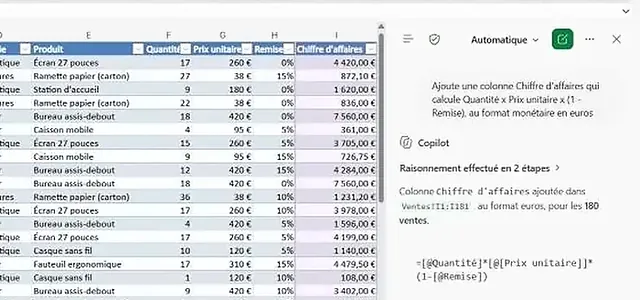
Copilot in Excel, with the controls of a financier
Calculated column, totals by region, pivot table, conditional formatting: our tutorial shows each instruction and how to check the result, with recalculated figures to support it, with a Microsoft 365 Copilot license.
The AI Finance kit, for independent practice
Before the training, or to start on your own: 24 use cases and 48 prompts organized into four levels, from the first variance comment to closing agents, with an Excel dataset to practice without exposing your figures.
- Positioning test and rules of the game: authorized data, verification, AI Act and GDPR
- 24 flashcards: easy to copy, variations, checkpoints, and classic traps
- Four challenges corrected using Solveo Industries' fictitious data
- Job-specific career path and 30-day deployment plan for the team
Receive the kit
The download links will be sent to you by email.
Your data does not leave your environment
Accounting data, forecasts, pre-publication information: your financial data does not leave your environment.
The exercises are based on your real-world situations, never on your actual data. We develop the practical cases with your business expert using anonymized or reconstructed examples, and we work within the environment approved by your IT department: Copilot Chat, Copilot M365, ChatGPT (Enterprise or Azure OpenAI), Gemini, Claude, Mistral, or a locally installed open-source solution for the most sensitive data. No documents, files, or personally identifiable information are transmitted to a public model during the session. The final part of the training is dedicated to GDPR, the AI Act, and the development of your internal usage rules, ensuring that each participant leaves with a clear understanding of what they can and cannot submit to an AI tool.
 Copilot M365
 Claude
 ChatGPT
 Gemini
 Vibe
VibeReferences and feedback
Some examples of interventions and feedback from NextStart.AI training courses.
 Airbus470 participantsAirbus595 participants
 CNES673 participants
 Alptis450 participants31 AI Champions
 Agirc-Arrco650+ participants
 Bristol Myers Squibb237 participants10 AI Champions
 Ceva Animal Health209 participants
 SATT network173 participants
 Cerema145 participants
 Engie11 participants
 AÉSIO mutual21 participants
 Crédit Mutuel13 participants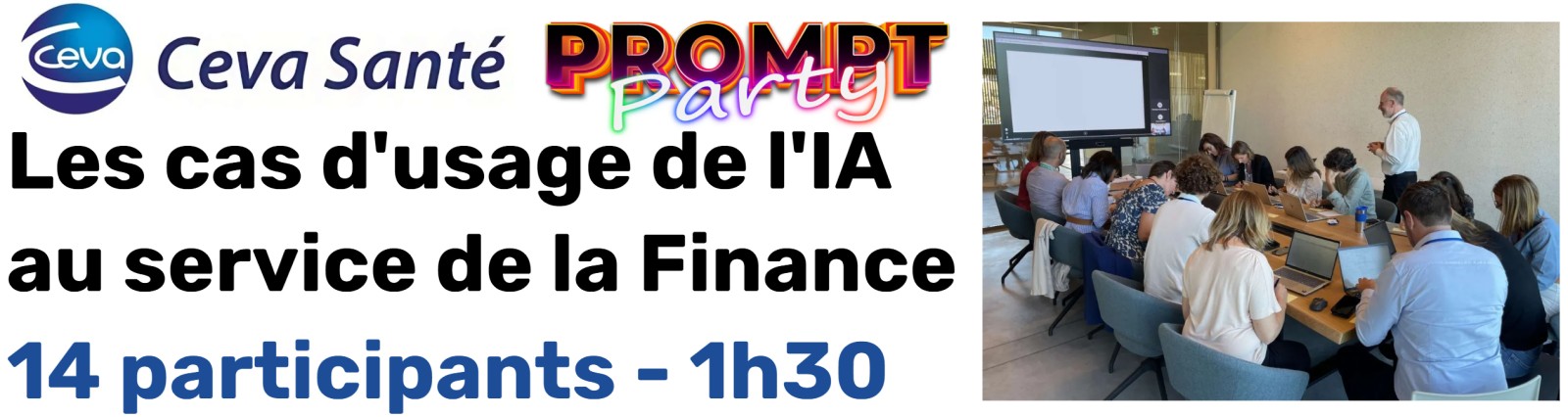
Customer reference
Professional training in generative AI
"Average rating of 8.7/10. Relevant examples, well-prepared beforehand, very concise and effective, training to be repeated as the tool is improved / Very good presentation, direct use of the tool, practical and educational."
Frequently asked questions about AI training for finance teams
Answers to key questions about the level, tools, personalization and modalities of the training.
Do you need to already know how to use ChatGPT or Copilot?
No. The content is adapted to the level of the participants, from the discovery of principles to the construction of more advanced working methods.
Can the training use our internal tool?
Yes. The session can be organized with the tool approved by your IT department, including Copilot, ChatGPT (Enterprise or Azure OpenAI), Gemini, Claude, Mistral or a local solution.
Can we work on our own use cases?
Yes. Priority situations are selected with your contact person before the session, then transformed into adapted and safe exercises.
What is the difference between the 1 hour 30 minute format and the half-day format?
The 1.5-hour format focuses on familiarization and includes some demonstrations. The half-day format allows for more hands-on practice, individualized feedback, and work on your specific use cases.
Can the training be funded?
Our training courses are eligible for OPCO and ESF+ funding. NextStart.AI helps you identify the necessary elements for your application.
Does AI perform financial calculations instead of human teams?
No. It helps to structure an analysis, explain discrepancies, or prepare a summary. The calculations and source data remain controlled within the company's tools.
Can we use our reporting templates during training?
Yes, provided that anonymized or reconstructed versions are used and the environment is validated by your organization.
How much does the training cost?
The price depends on the chosen format, the number of participants, and the number of sessions. We will send you a quote within 24 business hours of our initial discussion. Price ranges for standard formats can be found on the Corporate AI Training page.
How soon can a session be organized?
Allow one to two weeks between your agreement and the session, the time needed to coordinate with your finance contact, personalize the exercises and validate the schedule.
What deliverables do the participants receive?
A booklet of about fifty pages, the prompts and agents built during the workshop on your own cases, and the rules of use written collectively at the end of the session.
La formation IA convient-elle au contrôle de gestion ?
Oui. Les contrôleurs de gestion font partie du public de la formation, au même titre que la finance et la comptabilité. L’atelier travaille l’exploration des données et la détection des écarts, le suivi des points ouverts et des justificatifs manquants, la préparation des projections et la transformation des chiffres en recommandations compréhensibles par des non-financiers, à partir de vos situations réelles transformées en exercices sécurisés. Format de 1 h 30 ou d’une demi-journée, à partir de 1 500 € HT.
Quels cas d’usage du contrôle de gestion travaille-t-on pendant la formation ?
Les plus fréquents sont le commentaire des écarts budget / réalisé, la préparation des revues budgétaires, l’actualisation des forecasts, la fiabilisation des fichiers Excel et des tableaux de bord, et la traduction des chiffres pour les opérationnels. Nous les choisissons avec votre référent avant la session, à partir de vos propres fichiers anonymisés si nécessaire.
Copilot dans Excel est-il utile pour un contrôleur de gestion ?
Oui, pour expliquer ou écrire des formules, explorer un tableau, repérer des anomalies et préparer un premier commentaire. La formation montre aussi ses limites : les calculs restent vérifiés dans le fichier source et aucun chiffre n’est diffusé sans le contrôle du contrôleur de gestion.
Let's build your customized finance training
Describe your situation in a few lines. We will get back to you within 24 business hours with a proposal tailored to your teams, tools, and schedule.
Do you prefer to call or write? +33 1 89 16 48 05 or hello@nextstart.aiYour contact details are only used to reply to you.
NextStart is a training organization registered under number 11756140675. This registration does not constitute state approval.